
This Playtime Animations article in 3 key points
- A written goal and an attendance calculation are worth more than a catalogue: the set-up follows from them, you do not pick it off a shelf.
- Floor plan, dedicated socket, image consent, labelling of AI visuals: these four points are settled before signing.
- A dedicated host and a spot on a natural flow of people do more for footfall than the equipment itself.
Getting an AI activity right starts with scoping, not tech
The first question is not “which activity?” but “what should remain the next day?”. A set-up chosen for its visual effect draws a crowd. A set-up chosen for a goal delivers a usable result. The range of AI activities available is wide: all the more reason to start from the need rather than the catalogue. Two questions are enough to decide: who needs to go through the activity, and what do you do with it afterwards?
Tip 1: Start from what the event needs to deliver
Three common goals, three different set-ups. Getting visitors to move around a trade show stand calls for a short, standing format with an instant output. Creating a shared memory at an annual party calls for a format that leaves a physical trace. Getting two departments that never cross paths to talk calls for a collective format, where everyone contributes to the same piece. Write this goal down in one sentence before contacting a single supplier: it then becomes your deciding criterion at every step.
French companies invested €5.5 billion in events in 2024, according to UNIMEV. An activity is not a minor line item: it deserves the same scoping as a plenary session.
Tip 2: Put numbers on attendance, opening time and take-up rate
The most common mistake is arithmetic. A booth handles one session in 60 to 120 seconds, depending on the set-up and the number of people per photo. Over two hours of opening, that gives a ballpark of 60 to 120 sessions. With 300 guests and the aim of getting half the room through, a single booth is not enough.
So set three figures before any quote: the number of guests, the actual time the activity will be open, and the take-up rate you are aiming for. These three figures determine the number of set-ups and hosts. They also prevent the classic scenario of the buffet opening at the same time as the booth, which halves footfall without anyone having seen it coming.
Choose the set-up that fits the moment
The same device does not perform the same way at 6.30 pm in the reception area and at 11 pm on the dance floor. Choose the format according to the part of the event it slots into, then according to what it delivers.
Tip 3: The right format for each part of the event
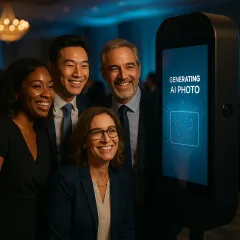
At reception and on a stand, go for a quick set-up with nothing heavy on the guest’s side: the participant poses, leaves with their visual, and the flow keeps moving. During a drinks reception, the AI Photobooth is at its best: people move around, come in twos or fives, and come back for more.
In a plenary session, a collective set-up projected on screen works better than an individual booth: it fills the dead time before the speeches and gets the room moving without disrupting the programme. Late in the evening, generative AI comes into its own again, with portrait transformations that get colleagues comparing results. The same budget gives very different results depending on the slot you choose.
Tip 4: Decide what the participant takes away
A paper print stays on a desk for months. A digital file goes out on social media within the hour. A collective artwork stays in the company lobby. These are three distinct uses: choose one main use, not all three.
This choice determines the equipment, the time per session and the cost. A printer adds a few seconds per session and a consumables constraint. A 100% digital output speeds up the flow but requires a clear way for guests to collect their file. The criteria for choosing an AI photobooth cover these trade-offs set-up by set-up.
Prepare the ground: technical, logistics and compliance
Two things can sink an activity the day before the event: a venue constraint discovered too late, and a legal point nobody dealt with. Both are settled on paper, several weeks ahead.
Tip 5: Check the space, power, connection and lighting
Ask the venue for the floor plan, not a description over the phone. Four points regularly cause problems: the available floor space with enough room to step back, a dedicated socket nearby, a stable network connection for generative processing, and the lighting in the area. Strong backlighting degrades every result, however good the model.
Add the access questions: loading bay, lift, set-up slot, deadline for dismantling. Allow one to two hours for set-up depending on the device, to be scheduled when guests are not there. A turnkey supplier takes care of the equipment, set-up and host, but needs this information to plan its work and avoid surprises on the morning itself.
Tip 6: Sort out image consent and AI transparency
A photo of an employee is personal data under the GDPR, and their image is protected by Article 9 of the French Civil Code. In practice: signage at the entrance announcing the set-up, image consent for any publication, a defined retention period and a clear channel for removal requests. The CNIL, the French data protection authority, recommends written permission whenever publication is planned.
The second, more recent point is transparency for AI content. The obligations under Article 50 of the European AI regulation apply from 2 August 2026 and require content generated or manipulated by AI to be flagged, according to the European Commission. Ask for the quote to specify how the supplier handles this labelling.
On the day it is about flow, afterwards it is about content
An activity without a dedicated host loses a good part of its potential. And content left sitting on a hard drive only serves for one evening. Both points need preparing; neither can be improvised.
Tip 7: A dedicated host, a queue that keeps moving
The host does more than keep an eye on the equipment. They explain how it works in ten seconds, encourage those who hold back, put groups together and moderate the generated visuals before printing or sharing. They make the difference between a booth used by the same twenty people and an activity that reaches the whole room.
Place the set-up on a natural flow: near the bar, on the way to the cloakroom, never in a blind spot. A queue of five people draws the curious. Beyond fifteen, guests give up and do not come back. If attendance calls for it, two small set-ups some distance apart work better than one very visible one: the queue spreads out and the take-up rate climbs.
Tip 8: Customise the output and give the content a life
A frame in your brand colours, a message built into the visual, a graphic look aligned with the theme of the evening: customisation turns an individual keepsake into a communication tool. It is prepared in advance, with your brand guidelines files, not the day before.
Finally, decide before the event who collects the files and for what use. A gallery shared with participants, a selection for the intranet, a collective wall printed at reception, as the Mosaic Wall AI allows: each use must fall within the scope of the consents collected.
Getting an AI activity right does not take more technology than last year. It takes a written goal, a floor plan, a legal framework and someone to keep the queue moving. The rest (the surprise, the portraits guests send each other) follows on its own. One question remains to settle early: what do you want to remain of this evening a week later? A conversation beforehand, through a quote request, lets you set these parameters before choosing the set-up.
FAQ: getting an AI activity right
What is an AI activity at an event?
An AI activity is a set-up that generates or transforms content live, based on a guest’s participation. A photobooth that restyles a portrait, a mural built in real time, artwork produced from a gesture: what they have in common is a personalised result, made on the spot in a few seconds.
How much does an AI activity cost for a corporate event?
The budget depends on four variables: the number of set-ups needed for the attendance, the opening time, the number of hosts and the type of output, printed or digital. Graphic customisation and the distance to the venue come on top. A reliable quote therefore requires you to share attendance, time slot and exact address.
Can an AI activity be customised in company colours?
Yes, on three levels: the dressing of the set-up, the frame and text added to the visual, and the graphic look applied by the model. Send your logo, brand guidelines and event theme at least two weeks ahead, to allow time to test the results and approve the visuals produced.
What happens to participants’ photos and data?
The organising company remains the data controller, even when the supplier operates the set-up. Three questions to ask when you get the quote: where the generated images are hosted, how long they are kept and who can access them. Also ask for documented deletion at the end of that period and a named contact for removal requests.